
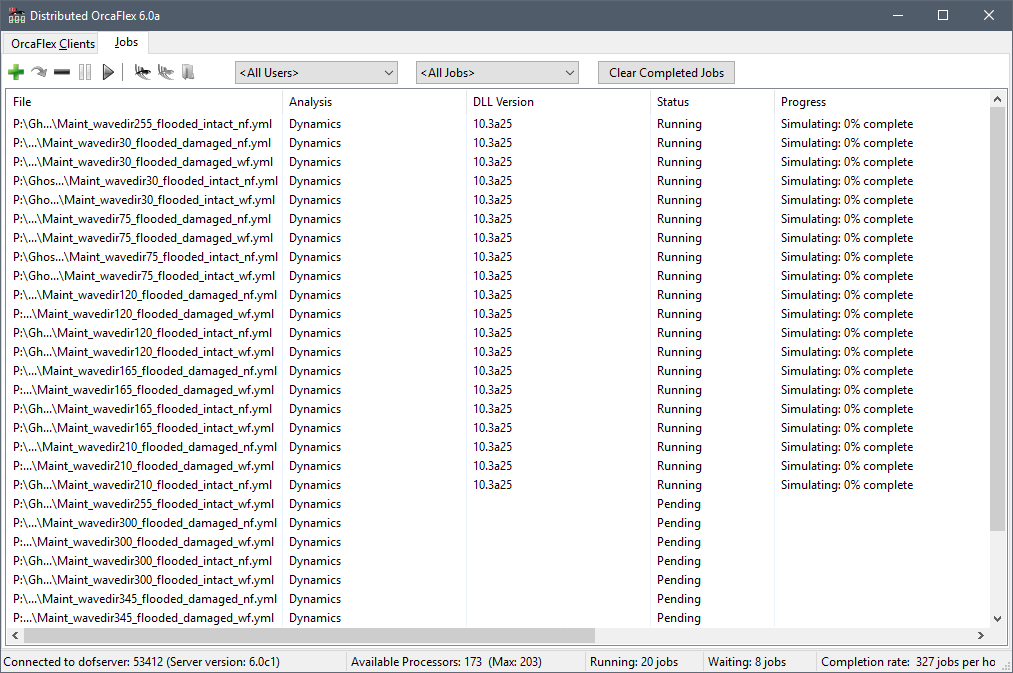
Distributed OrcaFlex consists of three separate programs. A Distributed OrcaFlex client program runs on each machine that is to process OrcaFlex jobs (each client machine must have an OrcaFlex licence). One machine on the network runs the Distributed OrcaFlex server program that coordinates the list of OrcaFlex jobs and allocates these to the clients. Finally, a Distributed OrcaFlex viewer program that displays the list of jobs and their current status (e.g. pending, running, completed etc.) and allows jobs to be submitted and stopped. The availability and job capacity of each client can also be managed from the viewer program. The viewer and server programs do not use an OrcaFlex licence.
To minimise the impact on a user’s work the client program runs at a low operating system priority, this ensures that OrcaFlex jobs run in the background and give way to higher priority user tasks.
Downloading and Installing Distributed OrcaFlex
The latest version of Distributed OrcaFlex is 8.0f which can be installed by following these steps:
- Read the introduction section of the documentation, including the installation guide.
- Download the following file: DistributedOrcaFlex.zip
- Unzip the contents, and run the extracted file DistributedOrcaFlex.msi.
Note: The minimum supported version of OrcaFlex is 10.0
Note: The client runs as a Windows service, but will not run using the ‘Local system’ account. During the installation you will be prompted for a set of credentials for the client service to run under. We recommend that you create a new user, for example ‘DOFUser’, that can then be used for all installations of the Distributed OrcaFlex client. This user should be created before you begin the installation and only be used for the Distributed OrcaFlex client service. This user must have the “Log on as a service” right and have rights to read and write to all areas of the network filing system that jobs may be submitted from including the location of OrcFxAPI.DLL and other required dll files. The “Log on as a service” right is normally set by group policy on the domain controller.
Python
If you intend to run OrcaFlex models that use external functions or post calculation actions then an appropriate version of Python must be present on the client computer. This should be a 64 bit version of Python that is supported by the versions of OrcaFlex that will be used.
More details on installing Python for OrcaFlex can be found on the OrcaFlex Python API page.
What’s new
Version 8.0f
Bug fix
The date information emitted as part of DOF console list output was not correct.
Version 8.0e
Console list output
The DOF console list all jobs command now has a more comprehensive output for both csv and yaml. This more closely matches the job details in the viewer program.
Version 8.0d
Support for OrcFxAPI EnableMultipleOrcFxAPIPythonModuleSupport policy
OrcaFlex version 11.6 introduces a new policy named EnableMultipleOrcFxAPIPythonModuleSupport. This policy must be enabled for any process that hosts multiple instances of the OrcFxAPI DLL and which use embedded Python (external functions, post calculation actions, user defined results, etc.) The Distributed OrcaFlex client process is the canonical example of a process that needs to use this policy, and so it enables this policy for each OrcaFlex DLL that it loads. If you are using OrcaFlex 11.6, and process jobs which use embedded Python, you must upgrade Distributed OrcaFlex so that this required policy can be enabled.
One consequence of the EnableMultipleOrcFxAPIPythonModuleSupport is that any embedded Python code must not explicitly import the OrcFxAPI module and instead rely on it being imported implicitly. This can be inconvenient, so if your Distributed OrcaFlex installation can guarantee not to use multiple instances of the OrcFxAPI DLL (i.e. you only use a single version of the DLL) then you do not need to enable this policy. You can arrange for the client process to skip enabling the policy by adding a registry setting for each machine which runs the client process:
Key: HKEY_LOCAL_MACHINE\Software\Wow6432Node\Orcina
Name: DOFSuppressMultipleOrcFxAPIPythonModuleSupport
Type: REG_DWORD
Value: 1
Version 8.0c
List files
The DOF viewer now has support for list files. You can submit jobs from a text file containing a list of OrcaFlex files. These files can be generated from the main jobs page or the submit dialog.
Bug fixes
- Jobs which used embedded Python scripts which enabled the boolean data type policy would fail.
- Relative paths in a text file would cause the DOF viewer and DOF console to throw an error when adding jobs if respect restart sequence was enabled, even if the file was not a simulation restart.
Version 8.0b
Bug fixes
- If a DOF client was started in disabled mode, it would seem to respond to processor count changes in the DOF viewer but would not take on any jobs.
- If the DOF viewer was reopened from the taskbar notification area it would not get an immediate update from the DOF server until the next status action or forced update. This could be 3 minutes if DOF was idle.
- If a DOF client had its MachinePriority value set in the registry, this was not acknowledged by the DOF server when the DOF client was restarted.
Version 8.0a
New job list views
There are now two tabs to view the list of jobs with different perspectives:
Active
The active list displays only the running or waiting jobs, the the same order as the job list in previous versions. However, it has a simplified interface for a quick overview.
Detailed
Batches of submitted jobs are now grouped together under the detailed tab. In this view, more information can be seen about particular jobs, and the order of jobs remains constant (sorted by age).
Batch actions
The new job list structure allows for actions that can be performed on a whole batch at once:
- Resubmit batch
- Cancel batch
- Pause batch
- Resume batch
High DPI
The UI elements of Distributed OrcaFlex now scale cleanly at any resolution, improving use with high DPI displays.
Status icons
Icons have been added to the job status for readabilty, doubling as a summary of the job list in the status bar.
Proxy client
Previously, each DOF client process on a large machine would communicate individually with the DOF server. To reduce the amount of network traffic, an extra client process is created as a proxy
, which collates the messages sent from and recieved by each subprocess.
File operations throttle
In place of the ramping feature, a throttle on the total saving and loading of jobs can be set to reduce the strain on the file server. If the total file operations exceed a certain threshold, the clients will delay the file read and writes by a random interval.
Batch notifications
Users can now be notified when an submitted batch has completed.